
Codex Micro is a $230 mini keyboard launched by OpenAI in 2026 to control its AI coding agents more quickly: accepting an action, rejecting a proposal, initiating a voice conversation, or adjusting the level of reasoning. For an SME, the value lies not in the gadget itself, but in what it reveals: AI tools are becoming concrete control centers, with impacts on productivity, automation, and governance.
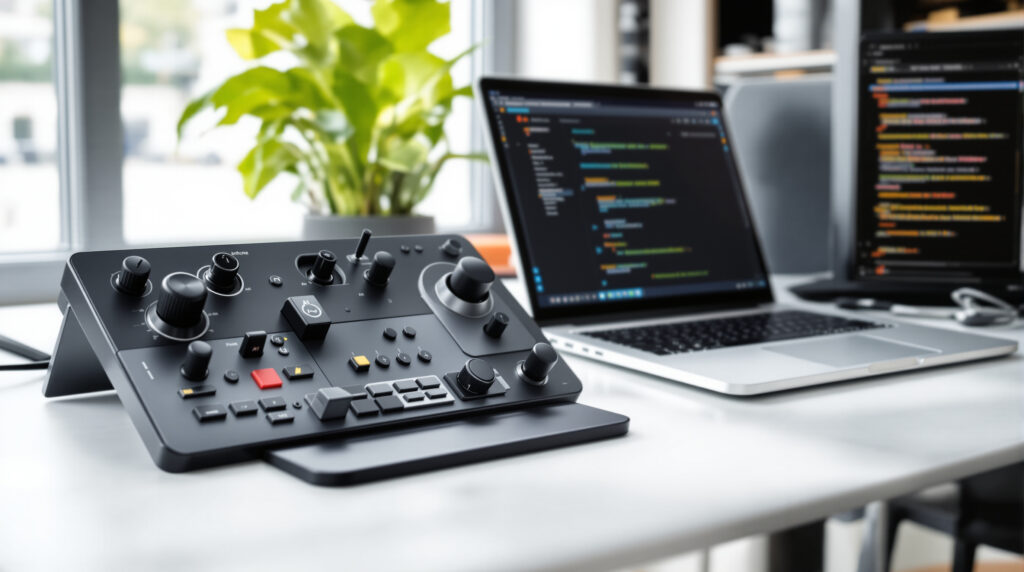
Codex Micro: What OpenAI Is Really Selling
OpenAI Supply Co.’s official product listing describes Codex Micro as an “for agentic work command center”—in other words, a small control console for working with AI agents. The listed product name is kbd-1.0-codex-micro. According to Axios, pre-orders opened on July 15, 2026; less than 24 hours later, eWeek reported that the device was already out of stock, and the official product page displayed “Out of stock” on July 17.
The product was designed in collaboration with Work Louder, a manufacturer known for its compact keyboards aimed at creators and advanced users. Tom’s Hardware notes that Codex Micro is based on Work Louder’s Creator Micro 2 platform. A word of caution, however: the value comes not only from the hardware, but also from its integration with ChatGPT Codex and Work Louder Input.
In practical terms, Codex Micro is used to translate frequent actions into physical gestures. A button can accept or reject a suggestion, a key can open a new chat, the joystick can trigger workflows (sequences of actions), and the scroll wheel can adjust the agent’s level of reasoning. This logic is similar to keyboard shortcuts, but designed for AI assistants that take the initiative.
Why a Mini AI Keyboard Is Also of Interest to Executives
At first glance, Codex Micro seems to be intended only for developers. In reality, it illustrates a broader trend: AI is making its way out of chat windows and into workflows. When an AI agent can read a request, suggest code, modify a file, and request approval, the question becomes less “which AI should we choose?” and more “who has the authority to approve what?”
For a digital project, this distinction affects the budget and the risks. An agency or in-house team can complete certain repetitive tasks more quickly: refactoring (code cleanup), test generation, documentation, and ticket preparation. But it must also put controls in place, because an AI agent can quickly apply the wrong instructions.
In the projects we’re working on, we often see the same pattern: benefits emerge when AI is integrated into a clear workflow, not when it’s added as a standalone tool. A physical button won’t save a disorganized or organization. It will only accelerate what already exists—for better or for worse.
This reasoning is consistent with the loop engineering, which involves delegating tasks to AI in short cycles : request, verify, corriger, follow up. Codex Micro embodies this cycle. It’s less spectacular than a demo video, but more revealing when it comes to assessing the actual impact on a project.
Features, Compatibility, and Known Limitations
The official specifications are quite detailed. The Codex Micro connects via Bluetooth or USB-C and is compatible with both Mac and Windows. It features RGB lighting, 13 mechanical switches, a touch sensor, a rotary encoder, and a planar joystick. The listed materials include CNC-machined PC, aluminum, a sandblasted anodized base, PBT and PC keys, a rubber joystick cap, and POM/POK switches.
The box includes the Creator Micro, a USB-C to USB-C cable, and a set of Codex keys. The product listing mentions 32 custom icons and 11 solid-color keys; it also states that the Codex Icon Keyset includes 32 additional keys. These kinds of details matter little to most executives, unless you’re equipping multiple workstations: accessories, availability, and replacement quickly become operational concerns.
On the software side, the officially listed compatible apps are ChatGPT Codex and Work Louder Input. eWeek also mentions integration with the ChatGPT desktop app—information that should be treated as a point reported by a media source. Featured functions include agent status displayed in RGB, workflows triggered by the joystick, command buttons such as “accept,” “reject,” “push-to-talk,” or “new chat,” and a scroll wheel to adjust reasoning.
| Element | Data to be released in 2026 | What This Means for a Project |
|---|---|---|
| Price | $230 on the official OpenAI page | Low cost per unit, but this must be multiplied by the number of items, training, and support |
| Connections | Bluetooth and USB-C | Simple deployment, but the company's security policy needs to be clarified |
| Compatibility | Mac and Windows | Suitable for mixed-gender teams, subject to software rights |
| Orders | 13 switches, touch sensor, scroll wheel, joystick | Useful for repeating validations and AI actions without disrupting the workflow |
| Software | ChatGPT Codex and Work Louder Input | Dependency on the OpenAI ecosystem and the workflows configuration |
| Availability | Out of stock reported less than 24 hours after opening | Not well suited for immediate, large-scale deployment |
The True Cost: Equipment, Time Saved, and Process Debt
$230 isn't a huge purchase on its own. However, the true cost of a Codex Micro isn't limited to the listed price. You also have to factor in setup time, configuring shortcuts, validation rules, user training, and, in some cases, a security review.
In France, for an SME, the actual budget for a serious pilot project involving AI development agents often exceeds the cost of the hardware. Instead, expect to spend a few hundred euros per user for tools and basic support, and several thousand euros if the goal is to integrate AI into a delivery cycle that includes a Git repository, automated testing, a pre-production environment, and rules. RGPD. With this budget, it's better to focus on two or three measurable uses rather than handing out gadgets.
The pitfall that non-technical people underestimate: speeding up the process also increases the rate of errors. If a developer proposes a code change and an “accept” button validates it too easily, you could introduce a regression (a bug that resurfaces) without even noticing it. User experience design must therefore slow down certain actions, not just speed them up.
Good decision-making involves reserving quick actions for reversible tasks: generating documentation, starting a new chat, creating a ticket, or running a test. For actions involving production, payments, personal data, or security, use the validation features in existing tools. GitHub, GitLab, Jira, Linear, Sentry, and the OVHcloud and Cloudflare environments already have their own automation workflows; it would be a shame to bypass them unnecessarily.
When Codex Micro Can Help, and When It's Useless
Codex Micro can be useful for a team that already uses ChatGPT Codex on a daily basis. For example, a developer who switches between reviewing proposals, simple cor queries, voice conversations, and refining reasoning can work more smoothly. A few seconds saved per action add up when those actions are repeated hundreds of times a week.
Honestly, this type of hardware is only worth it if your AI workflows are already well-established. If your company hasn’t yet defined how it uses AI for design, coding, testing, or documentation, start with that step. A specialized keyboard purchased too soon will end up in a drawer, just like many “productivity” peripherals.
The obvious solution may even be the wrong one. For a manager looking to reduce the lead time of a e-commerce website Whether it’s for a business application or not, purchasing AI tools will have almost no effect if the bottleneck stems from the specifications, internal approvals, or data that isn’t ready. Conversely, a technical team that’s already well-organized can start leveraging such a tool within a few days.
To assess your team's maturity, take a look at the use cases described in Practical Web and Mobile Development Techniques Using AI. Devices like Codex Micro come second: they optimize a use case; they don't create it.
Security, Governance, and Dependence on the OpenAI Ecosystem
A device that controls AI agents is not just a desk accessory. It can trigger actions on code, conversations, files, or work environments. This involves a few simple rules: log actions, restrict permissions, separate test and production environments, and maintain human oversight for sensitive decisions.
The GDPR, which has been in effect since 2018, remains a key consideration whenever a tool processes personal data: customer names, email addresses, order histories, and support tickets. Even though Codex Micro is a peripheral device, the data passes through the services it controls. The question to ask, therefore, is not “Is the keyboard secure?” but “Is the entire data flow secure?”
From the agency’s perspective, the standard approach is to map out access rights before automating. Who can request a change? Who can approve it? Where are the logs stored? What data is sent to which department? This framework may seem administrative, but it prevents costly incidents, especially in business applications or e-commerce platforms.
Vendor lock-in also warrants careful consideration. Codex Micro is officially compatible with ChatGPT Codex and Work Louder Input; this makes sense, but it ties usage to the evolution of these tools. If your AI strategy also includes Mistral AI, Claude, Gemini, or locally run models, check to see if your processes remain portables. On this topic, the approach presented around Mistral AI and Its Impact on Code helps compare technical options without limiting oneself to a single provider.
This launch is said to shape the future of digital projects
Codex Micro is probably not the major consumer device that people have been expecting from OpenAI. Axios notes that this is not the anticipated consumer product, which has been distinctly described as a potential smart speaker powered by ChatGPT. Here, the focus is more professional: OpenAI is testing a desktop device for those who work with agents.
For executives, the message is quite clear. Future productivity gains will come not only from more powerful models, but also from better-designed interfaces: buttons, visual indicators, voice commands, bord dashboards, and agents integrated into business tools. AI is becoming an orchestration layer.
This development will also have an impact on the referencing and content. Agents do not browse the web like humans; they rely on structured sources, clearly identified tags, and content that is easy to cite. Companies that are already anticipating the Link placement in ChatGPT and Google search results will find it easier to make their offers readable by these new intermediaries.
The best approach for a digital project is to distinguish between three levels: the visible tool, the process it streamlines, and the rules governing its use. Codex Micro falls into the first level. The return on investment depends on the other two.
Establishing a framework for this type of project early on helps avoid most unpleasant surprises: choosing AI tools, access rights, security, and measuring time savings. This is often where an outside perspective can save time, before purchasing equipment or making changes to an organization.
Frequently Asked Questions About Codex Micro
Is the Codex Micro a full-size keyboard?
No. Codex Micro is a mini keyboard—or macropad—with 13 mechanical keys, a joystick, a scroll wheel, and a touch sensor. It's designed to trigger commands, not to replace a standard keyboard.
How much does Codex Micro cost?
OpenAI's official product page lists Codex Micro at $230 in 2026. The total cost then depends on the number of users, the configuration, and the time spent integrating the tool into the team's workflows.
Does Codex Micro work on Mac and Windows?
Yes, the official product page states that it is compatible with Mac and Windows, with Bluetooth or USB-C connectivity. The software compatibility listed includes ChatGPT Codex and Work Louder Input.
Can Codex Micro reduce the time it takes to complete a web project?
It can help a team already familiar with AI agents work more efficiently on repetitive tasks. It won't significantly reduce lead times if the project lacks, above all, proper scope definition, rapid approvals, or clear specifications.
Is Codex Micro available for purchase?
According to eWeek, it was already sold out less than 24 hours after pre-orders opened on July 15, 2026, and the official product page showed “Out of stock” on July 17. Availability may therefore change depending on OpenAI’s restocks.